
Hub Elementor - Infinite Scroll for Blog Posts
Infinite Scroll for blog posts allows visitors to load the next blog post automatically when they reach the end of the current post. This helps users discover more content without returning to the blog archive.
Steps
- In the WordPress dashboard, go to Theme Options.
- Click Blog.
- Open Blog Single Post.
-
Scroll to the bottom of the page.
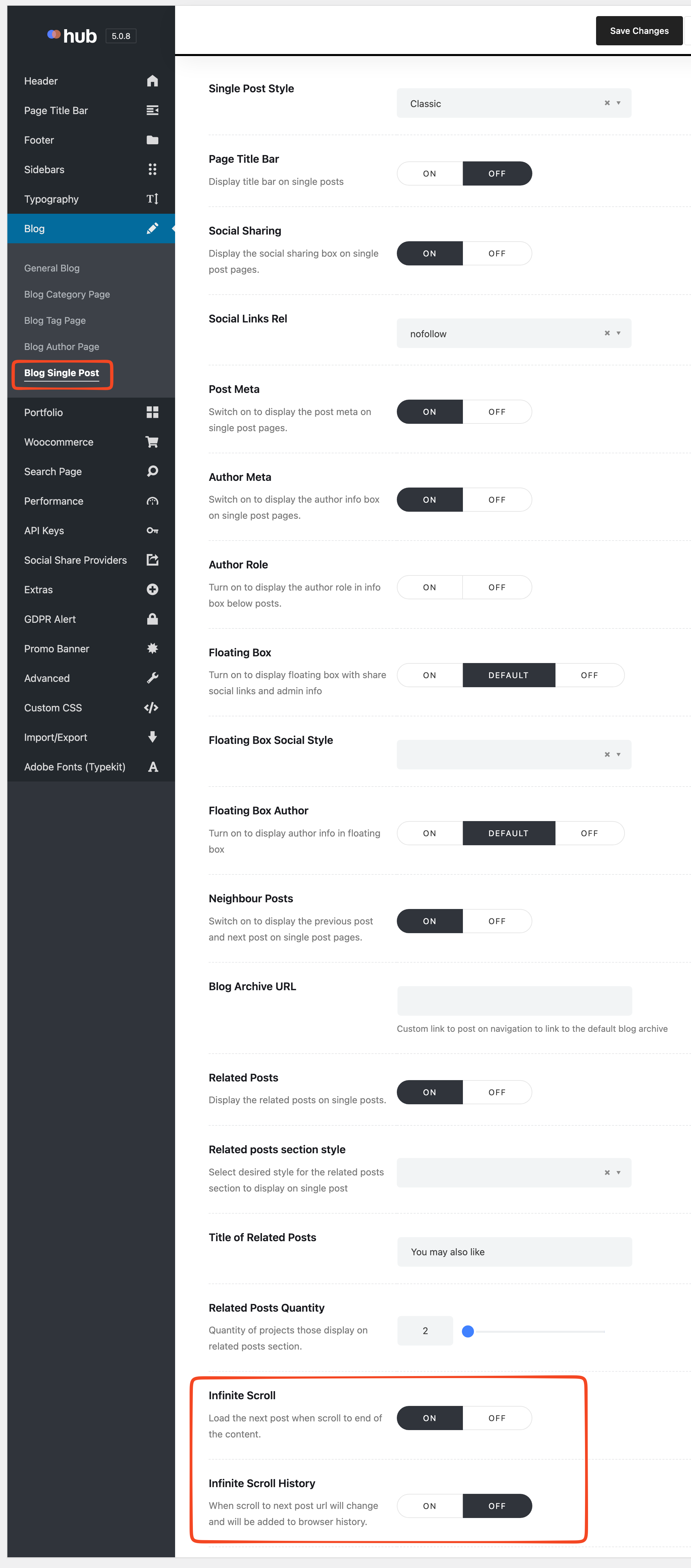
- Enable the Infinite Scroll option.
- (Optional) Enable Infinite Scroll History.
- (Optional) Enable Infinite Scroll Google Analytics Tracking.
- Click Save Changes.
Result
When visitors scroll to the end of a blog post, the next post loads automatically on the same page. If enabled, the browser URL updates and analytics data is tracked correctly.
Troubleshooting
- Next post does not load: Make sure Infinite Scroll is enabled and changes are saved.
- URL does not change: Ensure Infinite Scroll History is turned on.
- No data in Google Analytics: Verify that Google Analytics is properly configured and Infinite Scroll Google Analytics Tracking is enabled.